AI Voice Agent vs WhatsApp Chatbot: Which One Does Your Business Need?

An AI voice agent calls your leads and qualifies them in a real conversation — it reaches people who never reply to messages. A WhatsApp chatbot (WhatsApp AI agent) answers people who message you, at any hour, and is best for prices, brochures and documents. They are not competitors: call to qualify, use WhatsApp for details, and run both from one platform so every lead’s answers end up in one place.
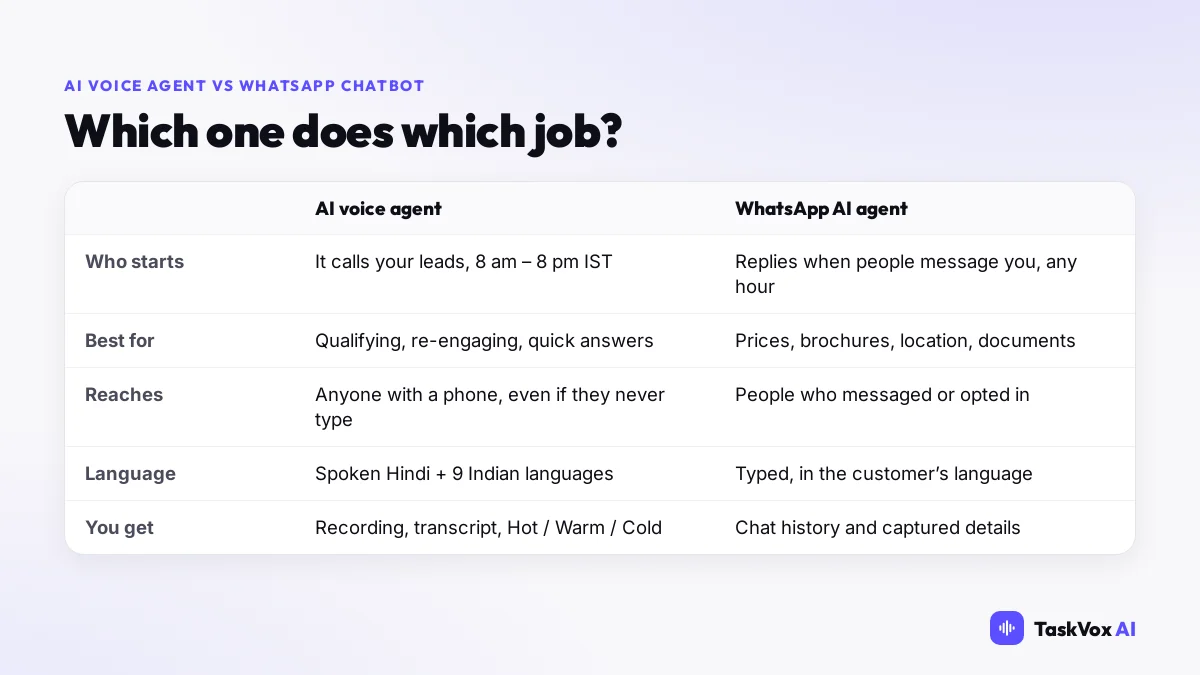
Indian buyers live on two channels: they pick up calls, and they read WhatsApp. Choosing between an AI voice agent and a WhatsApp chatbot is really choosing which job each channel should do. This guide explains both, with a simple plan for using them together.
What an AI voice agent does
An AI voice agent places phone calls and holds a natural conversation from your script: it greets the lead by name, asks your questions, answers common questions, and notes what the person said. On TaskVox every call gets a recording, transcript, summary and a Hot / Warm / Cold label.
- It starts the conversation. You don’t wait for the lead to write back.
- It reaches everyone with a phone, including people who are not comfortable typing.
- It speaks the lead’s language — Hindi, English and 9 other Indian languages.
- Outbound calls run between 8 am and 8 pm IST.
What a WhatsApp AI agent does
A WhatsApp AI agent replies on your WhatsApp Business number when people message you. It answers questions from the information you give it, captures details like budget, location or course, and your team can step into any chat.
- It answers at any hour, including nights and Sundays.
- It is best for details: prices, location, brochures, documents and photos.
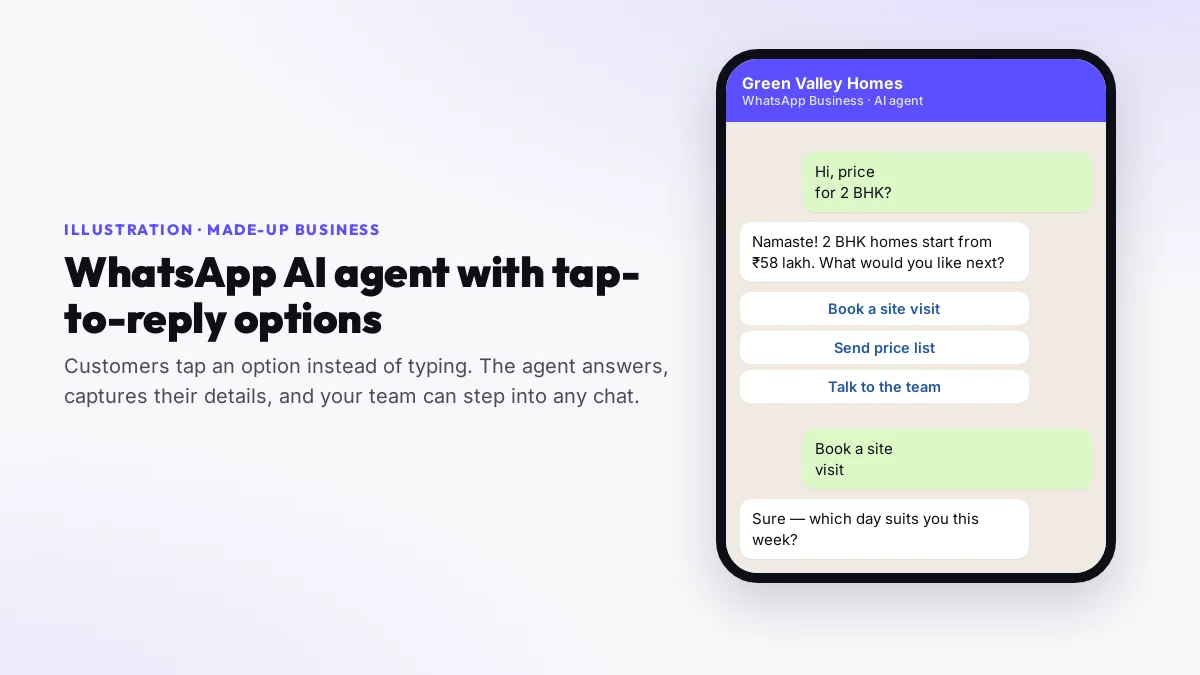
- It can show tap-to-reply options so customers choose instead of typing.
- To message someone first, outside an open conversation, WhatsApp requires an approved template and the person’s opt-in.
Side by side
| AI voice agent | WhatsApp AI agent | |
|---|---|---|
| Who starts | It calls your leads | The customer messages you |
| Best for | Qualifying, re-engaging old leads, reminders | Prices, brochures, location, quick questions |
| Hours | 8 am – 8 pm IST for outbound | Any hour |
| Reaches | Anyone with a phone | People who messaged you or opted in |
| You get | Recording, transcript, summary, Hot / Warm / Cold | Chat history and the details captured |
| Cost on TaskVox | ₹2–₹4 per answered minute | 1 credit per AI reply, at most 15 per chat (one customer, 24 h), from the same balance |
When to use voice, when to use WhatsApp
| Situation | Better channel |
|---|---|
| A new enquiry from an ad or a form — call while the interest is fresh | Voice |
| Hundreds of old leads that went quiet | Voice |
| Customers asking for a price list, photos or location | |
| Questions at 11 pm or on a Sunday | |
| Appointment or payment reminders | Voice (a call gets noticed) |
| Sending a brochure after a good call | WhatsApp (approved template) |
Use both: one follow-up plan
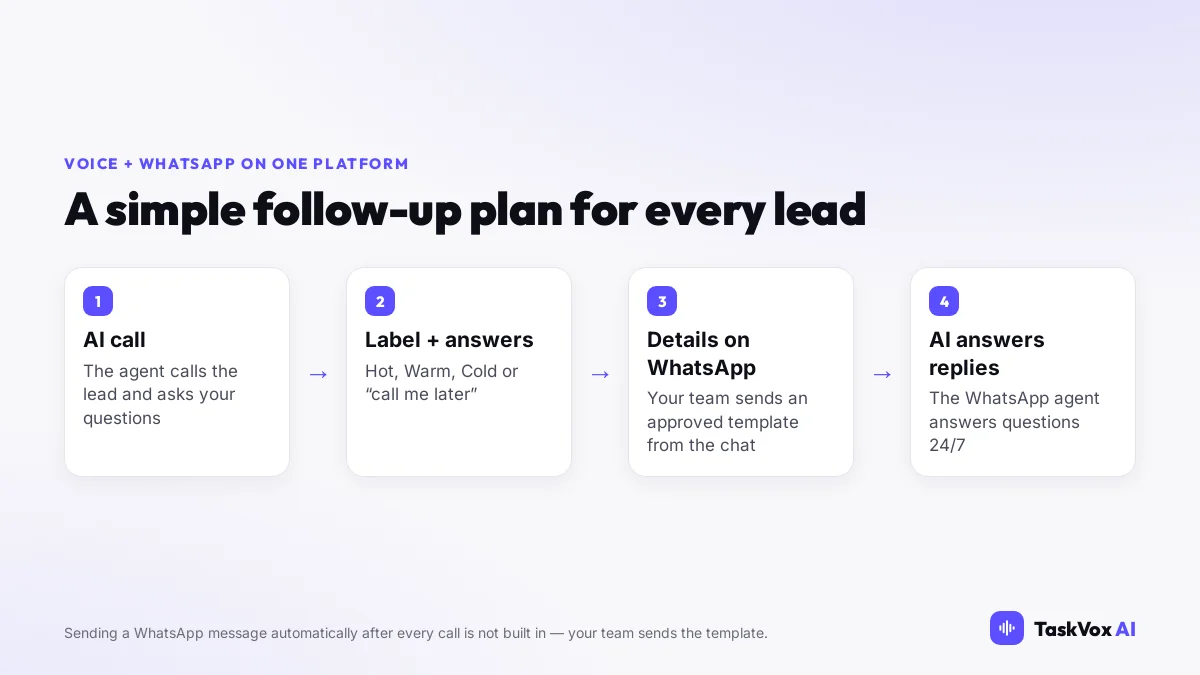
- AI call: the voice agent calls each new lead and asks your questions.
- Label and answers: every call is marked Hot, Warm, Cold or “call me later”, with the answers on the Leads page.
- Details on WhatsApp: for Warm leads, your team sends the brochure or price list with an approved template from the conversation.
- AI answers the replies: the WhatsApp agent answers their questions at any hour; your team steps in when a lead is ready.
A fuller 14-day plan is in our lead nurturing automation guide.
Setting it up on TaskVox
- Voice: create a voice agent (pick a use case and we write the script), test it, then upload your leads and start a campaign. See how to create an AI agent.
- WhatsApp: connect your WhatsApp Business number in WhatsApp Setup, create a WhatsApp agent with your information and the details it should collect.
- Leads: answers from calls appear under Call Leads, and from chats under WhatsApp Leads. Call results can also go to your CRM by webhook.
What it cannot do
- It does not send a WhatsApp message automatically after each call — your team sends the template.
- Outbound calls only run between 8 am and 8 pm IST.
- WhatsApp messages to people who haven’t messaged you need an approved template and their opt-in.
- Neither agent books into your calendar; they capture the preferred day and time for your team.
Voice agent vs WhatsApp chatbot — frequently asked questions
Is an AI voice agent better than a WhatsApp chatbot?
They do different jobs. A voice agent calls your leads and qualifies them in a real conversation, which works even with people who never reply to messages. A WhatsApp AI agent answers people who message you, at any hour, and is better for prices, brochures and documents. Most businesses get the best results using both.
Can one platform handle both outbound calling and WhatsApp automation?
Yes. TaskVox runs AI voice agents and WhatsApp AI agents in one account, with one credit balance, and the leads from both appear in your dashboard.
Does TaskVox send a WhatsApp message automatically after a call?
No. That is not built in. Your team can send a WhatsApp-approved template from a conversation, and the WhatsApp AI agent then answers the replies.
Can the WhatsApp AI agent show buttons?
Yes. When the agent asks a question with set answers, they can appear as up to 3 tap-to-reply buttons or a list of up to 10 options, depending on how your WhatsApp number is connected; otherwise the options are shown as a numbered list.
When can the voice agent call?
Outbound calls run between 8 am and 8 pm IST, as Indian calling rules require. WhatsApp replies and inbound calls are answered at any hour.
How much does it cost?
Voice calls are ₹2–₹4 per answered minute depending on your recharge, telecom included. A WhatsApp AI reply is 1 credit, and one chat (one customer, 24 hours) never costs more than 15 credits — from the same balance. See the pricing page for current rates.
Full-stack AI engineer specialising in voice AI, real-time communication systems and telephony. Built the TaskVox AI calling platform from the ground up. More articles →
Voice and WhatsApp agents in one account
100 free credits · ₹2–₹4/min for calls · no monthly fee